
The Resource Vault
200+ prompts, video training, use case libraries, tool guides, and expert support — everything your team needs to keep building AI capability. Updated monthly so you never fall behind.
Download One-PagerThe Resource Vault is included with the Kiingo AI Accelerator.
Trusted by 4,000+ executives across 600+ companies
See the Resource Vault in Action
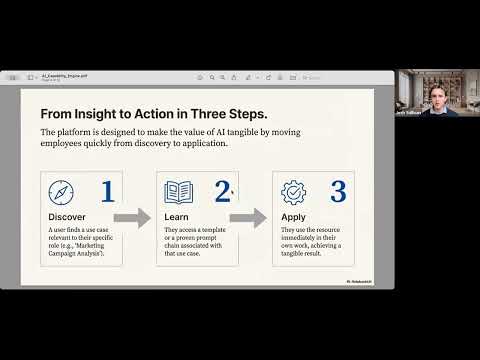
Loads YouTube only after you press play.
What's Inside the Resource Vault
Not a static resource library. A living system that evolves with AI — so your team always has what they need.
Use Cases
AI applications that work across all roles and departments. Universal workplace frameworks regardless of your function.
Prompt Engineering Foundations
Introductory videos on how LLMs work, create your personal context prompt, and master the fundamentals of prompt engineering.
Industry-Specific Prompt Packs
Real examples of AI solving problems you actually have. Not generic advice — actual workflows for your sector and role.
Quick Wins Library
Easy starter tasks that take 10 minutes and show immediate ROI. Your team sees what's possible on day one, not week six.
Monthly Webinars & Expert Access
Monthly webinars on new additions and emerging tools. Plus office hours where you can talk to experts and request specific resources.
AI Tool Reviews
Honest assessments of tools everyone's talking about — what they're good for, what they can do, and whether they're worth your time.
Sample Prompts from the Vault
Copy, customize, and use immediately. These are 4 of 200+ templates inside.
How to Use These Prompts
- Copy the prompt exactly as written into ChatGPT, Claude, or Gemini
- Replace the [BRACKETED TEXT] with your specific information
- Review and refine – these are starting points, not final drafts
Start with Prompt #1. It teaches AI who you are, making every other prompt 10x more relevant.
Your Executive Context Prompt
15 min to set up, saves hours foreverThis is the foundation. Create it once, paste it at the start of any AI conversation, and watch responses transform from generic to genuinely useful.
# My Context

## About Me
- Name: [Your Name]
- Role: [CEO/CFO/COO/CMO/etc.] at [Company Name]
- Years in role: [X years]
- Background: [Brief career background relevant to current role]

## About My Company
- Industry: [e.g., Commercial Construction, Manufacturing, Professional Services]
- Employees: [Number]
- Annual Revenue: [Range, e.g., $15-50M]
- Company Age: [Years in business]
- Ownership: [Private, Family-owned, PE-backed, Public, etc.]
- Geography: [Primary markets/locations]

## My Key Priorities This Quarter
1. [Priority 1 - e.g., "Improve operational efficiency by 15%"]
2. [Priority 2 - e.g., "Develop succession plan for key roles"]
3. [Priority 3 - e.g., "Evaluate AI adoption for back-office functions"]

## My Communication Style Preferences
- I prefer: [Direct and concise / Detailed analysis / Executive summaries first]
- Typical decisions I make: [Strategic partnerships, capital allocation, hiring leadership, etc.]
- I report to: [Board, Investors, Family ownership group, CEO, etc.]

## Important Context
- [Any other relevant info: Vistage/EO/YPO member, recent acquisition, growth phase, industry challenges, etc.]

---
When responding to me, remember this context. Be direct, avoid jargon, and give me actionable recommendations—not just information. I can handle hard truths.
AI without context is like hiring someone who knows nothing about your business. Use this before jumping into ChatGPT with a question—it front-loads the 20% of information that drives 80% of relevance.
Your Skeptical Advisor & Thinking Partner
Use anytime you need to pressure-test an ideaThe best advisors aren't yes-men. This turns AI into a skeptical-but-constructive board member who challenges your assumptions and helps you think through problems more rigorously.
I want you to act as a skeptical but constructive advisor—like a seasoned board member or peer group member who genuinely wants me to succeed but won't let me get away with fuzzy thinking.

Your job is NOT to:
- Tell me what I want to hear
- Just validate my ideas
- Be negative or dismissive

Your job IS to:
- Challenge my assumptions respectfully
- Find the holes in my logic
- Ask the hard questions I might be avoiding
- Play devil's advocate when useful
- Help me see blind spots
- Push back when something doesn't add up
- Ultimately help me make better decisions

COMMUNICATION STYLE:
- Be direct and concise
- When you disagree, explain why
- Ask probing questions rather than just stating opinions
- If I'm overcomplicating something, say so
- If I'm missing something obvious, point it out
- Give me your honest assessment, even if it's uncomfortable

---

HERE'S WHAT I'M THINKING THROUGH:

[Describe your situation, idea, decision, or problem. Be specific. Include:
- What you're considering doing
- Why you think it might work
- What's at stake
- Any concerns you already have
- Context that matters]

---

Please:
1. Start by making sure you understand what I'm actually trying to accomplish
2. Identify the 2-3 assumptions I'm making that could be wrong
3. Ask me the questions I should be asking myself
4. Tell me what you'd want to know if you were in my shoes
5. Give me your honest reaction—including if you think I'm on the right track

Don't hold back. I'd rather hear hard truths now than learn them the expensive way later.
Use for: major hiring decisions, strategic pivots, partnership opportunities, capital allocation, pricing changes, org structure decisions—any time you'd normally want to talk it through with a peer.
Spreadsheet Analysis & Data Help
2 min vs. 30 min Googling formulasEvery executive lives in spreadsheets. Stop wrestling with Excel formulas or trying to make sense of raw data. Describe what you need in plain English, get the exact formula or analysis back.
I'm working in Excel/Google Sheets and need help with [CHOOSE ONE]:

OPTION A - BUILD A FORMULA:
My data structure:
- Column A: [What's in it, e.g., "Date"]
- Column B: [What's in it, e.g., "Product Name"]
- Column C: [What's in it, e.g., "Sales Amount"]
- [Add more columns as needed]

What I need to calculate: [Describe in plain English, e.g., "Sum all sales for Product A in January 2024" or "Find the average order value by customer" or "Flag any row where the amount exceeds $10,000"]

---

OPTION B - FIX A BROKEN FORMULA:
Here's my formula that isn't working:
[PASTE YOUR FORMULA]

What it's supposed to do: [Explain expected behavior]
What it's actually doing: [Explain the problem—error message, wrong result, etc.]

---

OPTION C - ANALYZE THIS DATA:
[PASTE YOUR DATA - up to ~100 rows works well]

Please analyze this data and tell me:
1. What are the key trends or patterns?
2. What stands out as unusual or worth investigating?
3. What would you recommend I look at more closely?

---

Please explain your formula/analysis so I understand the logic.
For complex spreadsheets, paste a sample of your data (headers + 10-20 rows). AI can build formulas that work on your actual structure, not generic examples.
30-60-90 Day Onboarding Plan
15 min vs. starting from scratchEvery new hire deserves a clear path to success. Generate role-specific onboarding plans that set expectations, define milestones, and reduce time-to-productivity.
Create a 30-60-90 day onboarding plan for a new hire.

ROLE DETAILS:
- Position: [Job Title]
- Department: [Department]
- Reports to: [Manager Title]
- Direct reports: [Number, if any]
- Start date: [Date]

COMPANY CONTEXT:
- Company: [Name and brief description]
- Industry: [Industry]
- Company size: [Employees]
- Current priorities: [What's the company focused on right now?]

ROLE EXPECTATIONS:
- Why we hired this person: [What problem are they solving?]
- Key responsibilities: [List 3-5 main responsibilities]
- Success metrics: [How will we measure their performance?]
- Biggest challenges: [What will be hardest about this role?]

Please create a 30-60-90 day plan with:

FIRST 30 DAYS - "Learn & Listen"
- Key people to meet and why
- Systems and processes to learn
- Quick wins to target
- Success criteria: "By day 30, they should be able to..."

DAYS 31-60 - "Contribute & Build"
- First projects to own
- Relationships to deepen
- Success criteria: "By day 60, they should have..."

DAYS 61-90 - "Lead & Optimize"
- Full ownership expectations
- Strategic contributions expected
- Success criteria: "By day 90, they should be..."

Format this as a document I can share with both the new hire and their manager.
Create a template for each key role type (Sales, Operations, Finance, etc.) and save them. When you hire, customize with role-specific details rather than starting from scratch every time.
Expert Support Built In
The Resource Vault isn't just resources — it comes with real human support to keep your team moving.
Daily Office Hours
Drop-in sessions where your team can bring real challenges and get expert guidance — no appointment needed.
AI Advisory
Strategic consulting on AI implementation, tool selection, governance, and workflow design from experienced practitioners.
Advanced Bootcamps
Hands-on training programs to build deep skills in a specific AI specialization.
What Members Say
"The most impactful takeaway was learning how to create GPTs. I used the system to build systems that work for me. Now, I have a fleet of specialized GPTs that assist with different aspects of my day-to-day work, from part creation in our ERP system to managing our talent pipeline."
"Delivering actual ROI, tangible skills, and cutting-edge knowledge on AI implementation has been a huge win for our company."
Frequently Asked Questions
Can I search by my industry?
Yes. Resources are tagged by industry, department, role, and difficulty level.
How often is content updated?
Monthly. New prompts, tool reviews, and use cases are added based on what's changing in AI and member feedback.
Is this included with other programs?
Resource Vault access is included with the Champions Group and the AI Accelerator. It's also available as a standalone subscription.
Can I request custom prompts?
Absolutely. Members can request specific resources, and we build them into the next monthly update.
Ready to Access the Resource Vault?
Book a free strategy call and we'll walk you through what's inside — and how it fits your team's needs.